Data onboarding
Transferring data sets to your AI space
Before starting your GPU subscription you have an opportunity to prepare your data set to be ready on the launch date. If this is the need, we can prepare data proxy Kubernetes pod with high throughput Internet connection, which will let you to transfer the data sets directly to your AI space, which is Kubernetes Persistent Volume Claim.
Why to store the data in PVC?
Storing your data sets, for instance, in S3 object buckets is convenient, cost-effective choice for cold data. However, during your subscription you probably would like to fully utilize GPUs. That’s why optimal way of data access to the AI space is needed.
On the DGX level we mount your dedicated File System from Pure Storage FlashBlade array with NFS over RDMA (RoCEv2) using dedicated vendor drivers certified by NVIDIA and called GPUDirect Storage. Thanks to this, possibly minimum latency is achieved between the DGX and the array, which is crucial for typical training or processing data sets, usually containing thousands or much more small objects. It guarantees the storage is not a bottleneck in GPU accelerated processes.
On top of such dedicated NFS mount point a Persistent Volume Claim is created and added to your project in a workload platform like Run:ai, so the consumption by the various workloads is available. In case of data proxy pod, the mount point can be found at /data path.
Anyway, S3 bucket data source is still an option in some cases, but usually far from the optimal one, which we cannot recommend in F.I.N. architecture.
Data proxy
Access
The public SSH access will be provided to you by our team after sharing with us your public key. To achieve optimal transfer performance and keep your data safe we recommend Ed25519 format.
Use cases
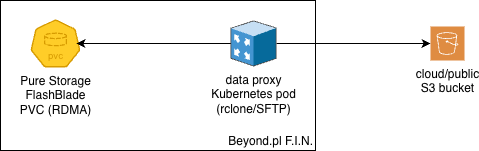
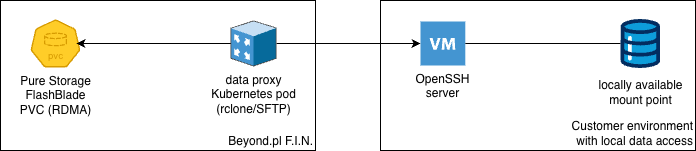
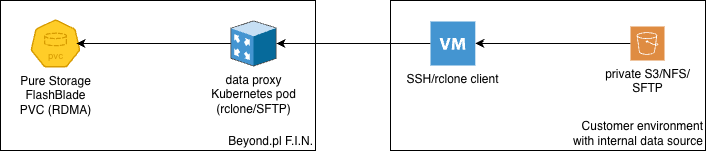
The data proxy is prepared to be both connection initiator (client) or its server (SFTP/SSH), depending on your needs. This is example use cases with corresponding diagrams:
downloading the data from your S3 bucket, whose endpoint is accessible from the Internet using your keys;
you could also connect to your SSH/SFTP server with SSH key pair to fetch the data;
or just connect from your server to the data proxy using SSH/SFTP (also with key pair) to transfer the data accessible only from your local network.
The transfer tool
Depending on your network connection throughput, using just SCP or SFTP protocols, or even rsync, probably won’t provide enough parallelism to fully utilize it; particularly with vast number of small objects. We propose Rclone - Swiss Army knife in terms of data sync between dozens types of spaces.
If this is not right choice for you and you have already another preferred tool, let us know before the pod creation to include it for you.
Rclone - configuration
You can use rconfig config command to begin with configuration of remote endpoints like SFTP (using an OpenSSH server) or S3 by interactive way. Though, some additional tuning parameters may be recommended to add to the config as shown below.
The placement of rclone configuration and usage - F.I.N. data proxy or a server in your environment - depends on the use case mentioned earlier.
Those are complete templates of endpoints to be saved in ~/.rclone/rclone.conf config file.
[s3]
type = s3
provider = Other
access_key_id = <your_key>
secret_access_key = <your_key>
endpoint = <s3_address>
acl = private

[sftp]
type = sftp
host = <ssh/sftp address>
user = <user>
key_file = ~/.ssh/id_ed25519
shell_type = unix
sha1sum_command = sha1sum
#disable_hashcheck = true
md5sum_command = none
Please verify your specific protocol configuration in the Rclone documentation. Remember to provide an SSH key in the configured path. We recommend generating a fresh pair for connection between sites - when the Rclone remote is SFTP - particularly for this purpose. ssh-keygen without any additional parameters on the data proxy produces already an optimal result.
In case of SFTP protocol you can find your CPU being busy due to checksums calculations. In such case disabling checksums with disable_hashcheck commented parameter could be worth considering.
Rclone - usage
The following examples show parameters, which we found optimal utilizing powerful CPU. Feel free to experiment with numbers to match your environment.
As the source or destination indicators both remote endpoints aliases included in configs and local paths can be provided in rclone command. Just to be clear, Rclone uses its own SSH client, so the complete configuration for SFTP remote points is required to be included in the Rclone config file.
From public S3 bucket to the local PVC mount point:
rclone copy \
  --no-check-certificate \
  --transfers 128 \
  --checkers 128 \
  --fast-list \
  --multi-thread-streams=4 \
  --buffer-size=32M \
  -P \
  s3:bucket/path /data/dataset
From S3 accessible (and therefore run) from your server through your local network to the PVC mount point on F.I.N. data proxy:
rclone copy \
  --no-check-certificate \
  --transfers 128 \
  --checkers 128 \
  --fast-list \
  --multi-thread-streams=4 \
  --buffer-size=32M \
  -P \
  s3:bucket/path dataproxy_sftp:/data/dataset
Remove --no-check-certificate option from above examples if using trusted certificate chain.
From the file system path accessible (and therefore run) from your server to the PVC mount point on F.I.N. data proxy:
rclone copy \
  --transfers 128 \
  --checkers 128 \
  --multi-thread-streams=4 \
  --buffer-size=32M \
  -P \
  /local/path/to/dataset dataproxy_sftp:/data/dataset
Because the transfer of the data set is often expected to be long lasting, it’s worth to run the tool in a screen: screen -S rclone - to create a new session; screen -r rclone - to attach a console to it; ctrl + A + D - to detach from it.
In case of the transfer disruption, don’t worry; you easily can run rclone copy operation again. Rclone will compare the source with the destination and will copy only omitted or wrongly copied files to the destination.
Both protocols presented above - SFTP and S3 (HTTPS one) - utilize encryption, so your data is safe during the transfer through the Internet. However, when your data does not require encryption on a transport layer - for instance, those are public data or a dedicated connection is already considered as safe - there is a possibility of using unencrypted Rclone WebDAV server and client between sites. Due to security risk and doubtful performance improvement (current CPUs offload popular encryption algorithms like AES 256), we are not publishing the example. Keep it in mind during consideration of the transfer protocol.
Data transfer completion
When the data transfer is done, create a ticket request, please. Our team will shutdown the a data proxy instance and share the PVC to your F.I.N. project to be used as a data source in workloads of your choice.